Skip to content


When you walk up to a modern office building, you likely see a sleek glass door and a glowing with a blue light. You tap your badge, the lock clicks, and you walk inside. For most of us, this is a mindless routine. But for a person using a wheelchair or someone with limited manual dexterity, that simple sequence can become a significant barrier.
Security should never come at the cost of accessibility. In fact, under the Americans with Disabilities Act (ADA), it cannot. If you manage a facility or own a business, your access control systems must serve everyone equally. This isn’t just about avoiding a lawsuit; it is about creating a workspace where every employee and visitor feels welcome and safe.
Navigating the intersection of high-tech security and federal accessibility laws can feel a bit like a balancing act. Let’s look at how you can make your entryways both secure and compliant.
Why Accessibility Matters for Modern Security
The ADA was passed in 1990 to ensure that people with disabilities have the same rights and opportunities as everyone else. Over the decades, technology has changed, but the core principles remain the same. If a door is locked by an electronic system, that system must be usable by people with various physical, sensory, and cognitive needs.
From a business perspective, a compliant building is a functional one. If a delivery driver with a cart or a client using a walker struggles to enter your lobby, your security system isn’t working as it should. Truly effective security is seamless; it protects the perimeter without getting in the way of the people it’s meant to serve.
Essential ADA Standards for Entry Systems
The ADA Standards for Accessible Design address details ranging from hallway width to the amount of force needed to open a door. When it comes to electronic locks and card readers, two key factors determine both where the hardware is installed and how it is used.
Reach Ranges and Mounting Heights
One of the most common mistakes in security installations is mounting card readers or keypads too high. If a person in a wheelchair cannot reach the reader, the system is not compliant.
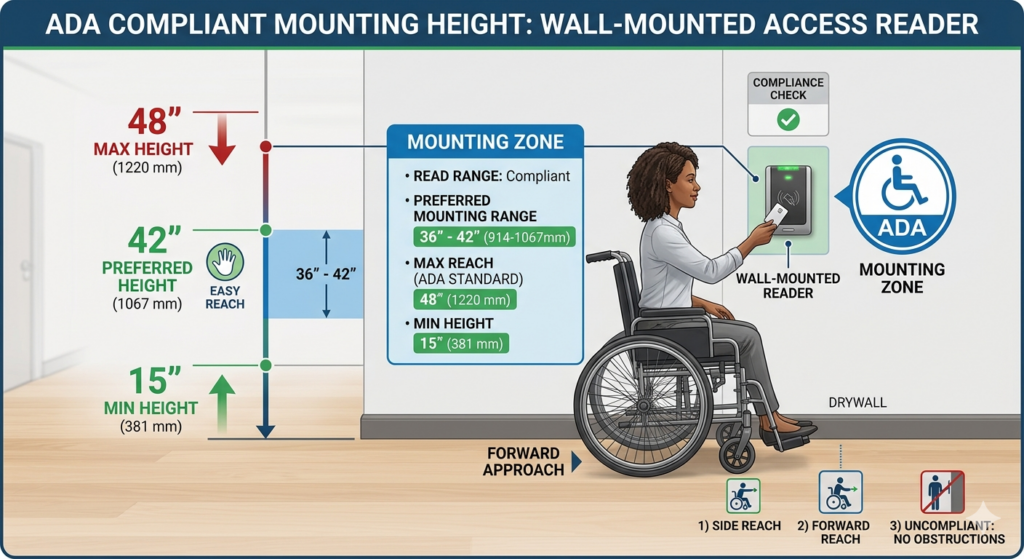
Generally, any operable part of a security system like a keypad, a card swipe, or a “request to exit” button must be placed within a specific “reach range.”
- The 48-Inch Rule: Most controls should be mounted no higher than 48 inches above the floor.
- Side Reach: If a person has to approach the reader from the side (common in narrow hallways), the maximum height is still 48 inches, and the minimum is 15 inches.
- Obstructions: If the reader is placed behind a counter or a ledge, the allowable height drops.
When we help clients plan their access control systems, we often suggest aiming for a 42-inch mounting height. This is a “sweet spot” that is comfortable for standing adults and easily reachable for those in seated positions.
Clear Floor Space and Approach
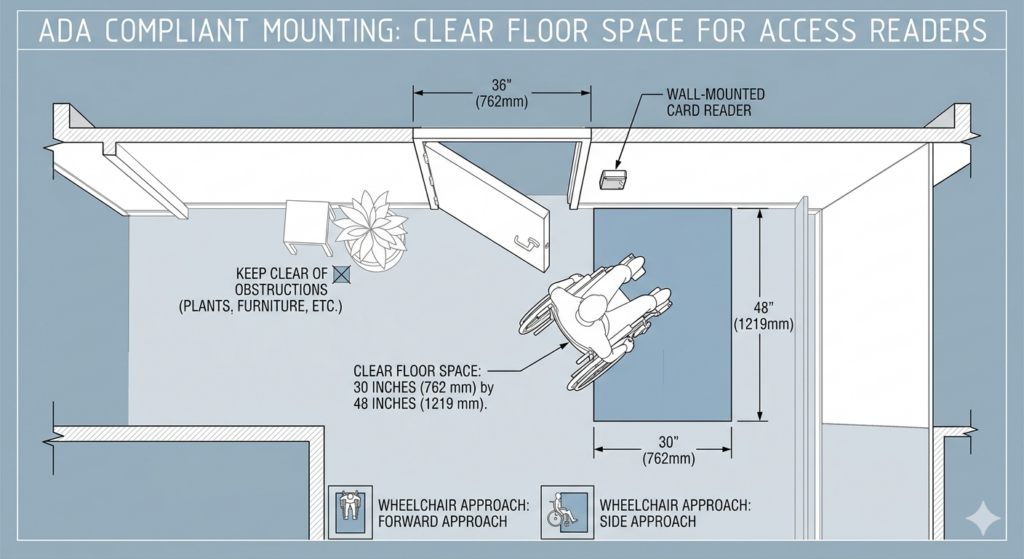
It isn’t enough to just put the reader at the right height. You also have to make sure a person can actually get close to it. The ADA requires a clear floor space of at least 30 inches by 48 inches in front of any operable part.
If a keypad is placed in a tight corner where a wheelchair can’t easily turn, it creates an access barrier. Make sure the area around your card readers is clear; avoid trash cans, plants, or heavy furniture so everyone can use them comfortably.
Hardware Requirements for Accessible Doors
Once the reader is cleared, the door itself has to behave. This is where the mechanical side of security meets the electronic side.
Opening Force and Closing Speed
An ADA-compliant door should not require more than 5 pounds of force to open. This can be tricky when you are using heavy-duty security hardware like magnetic locks (maglocks) or electric strikes.
If the door is too heavy, you might need to install an automatic door operator. These are the “push to open” buttons you see in hospitals and grocery stores. Modern security systems can be integrated with these operators. When a user presents a valid credential, the lock releases and the automatic opener swings the door wide.
The “Closed Fist” Test
This is a simple rule of thumb for any door hardware. A person should be able to operate the door or the security device without tight grasping, pinching, or twisting of the wrist.
- Keypads: Buttons should be large enough to be pressed with a knuckle or a closed fist.
- Levers vs. Knobs: Round doorknobs are generally a no-go for ADA compliance. Lever-style handles are the standard because they can be pushed down with an elbow if necessary.
The Rise of Touchless Access and Mobile Credentials
Technology is actually making ADA compliance much easier than it used to be. The shift toward “contactless” entry is a win for everyone.
Mobile Apps as a Solution
Using a smartphone as a key card is a game-changer for accessibility. For a person with limited mobility, pulling a plastic card out of a wallet can be a struggle. However, most people already have their phones mounted to their wheelchairs or easily accessible in a pocket.
With a mobile access control system, the door can unlock automatically via Bluetooth as the person approaches. This removes the need to physically reach for a reader or press a button entirely. It is a perfect example of how modern tech solves old compliance headaches.
Biometrics and Facial Recognition
While still emerging in some sectors, facial recognition is another “frictionless” way to handle entry. If the system recognizes your face and unlocks the door as you walk up, the physical barriers of reach and manual dexterity disappear. However, you must ensure the camera’s field of vision is wide enough to capture faces at both standing and seated heights.
Sensory Feedback: Hearing and Vision Needs
ADA compliance isn’t just about physical movement. It also covers sensory disabilities. A security system needs to communicate its status in more than one way.
If your card reader only shows a green light when a door unlocks, a person with a visual impairment won’t know they have been granted access. Conversely, if it only makes a loud “beep,” a person who is hard of hearing might be left guessing.
To be truly accessible, your readers should provide:
- 1. Auditory Signals: A clear beep or tone when the card is read.
- 2. Visual Signals: A light that changes color or flashes.
- 3. Tactile Elements: Keypads should have a raised dot on the “5” key so a user can orient their hand by touch.
Common Mistakes in Commercial Security Installs
Even well-meaning managers often miss the mark on a few specific items. In our experience, these are the most frequent blunders:
- The “Exit” Problem: People focus so much on getting into the building that they forget about getting out. “Request to Exit” (REX) buttons must follow the same height and force rules as the entry readers.
- Timing Issues: If the door stays unlocked for only three seconds, a person using a walker might not have enough time to get through before the lock re-engages. Make sure your system allows for adjustable “strike times.”
- Poor Lighting: If the keypad is in a dark alcove, it becomes a barrier for people with low vision. Ensure entry points are well-lit.
A Checklist for Facility Managers
If you are worried about your current setup, walk through this quick list:
- Measure the height of every card reader and keypad. Is any part above 48 inches?
- Check the force required to open the main entry doors. Does it feel like a workout?
- Look for obstacles. Is there a “display table” blocking the path to the scanner?
- Test the feedback. Does the reader beep and light up?
Building a Culture of Access
At the end of the day, ADA compliance shouldn’t be viewed as a set of annoying rules to follow. It is a framework for better design. When you make your building easier for someone in a wheelchair to navigate, you also make it easier for the person carrying two armfuls of groceries, the parent with a stroller, and the elderly visitor.
Investing in a high-quality access control system that prioritizes these standards is simply good business. It shows that you value every person who enters your space. If you are planning a new installation or upgrading an old one, take the time to do it right. The goal is a secure environment where the only thing being kept out is the threat, not the people.